Cybersecurity
September 17, 2026
Verify AWS KMS FIPS compliance with this step-by-step guide covering FIPS 140-3 HSMs, endpoints, and auditing for regulatory alignment.
Configure an Amazon Linux firewall as a host-level control alongside AWS Security Groups and network ACLs. On Amazon Linux 2023, install and enable firewalld, confirm the active zone, and allow only the services and ports each instance needs. This creates a practical extra layer against unwanted traffic, including traffic that may originate inside the VPC.
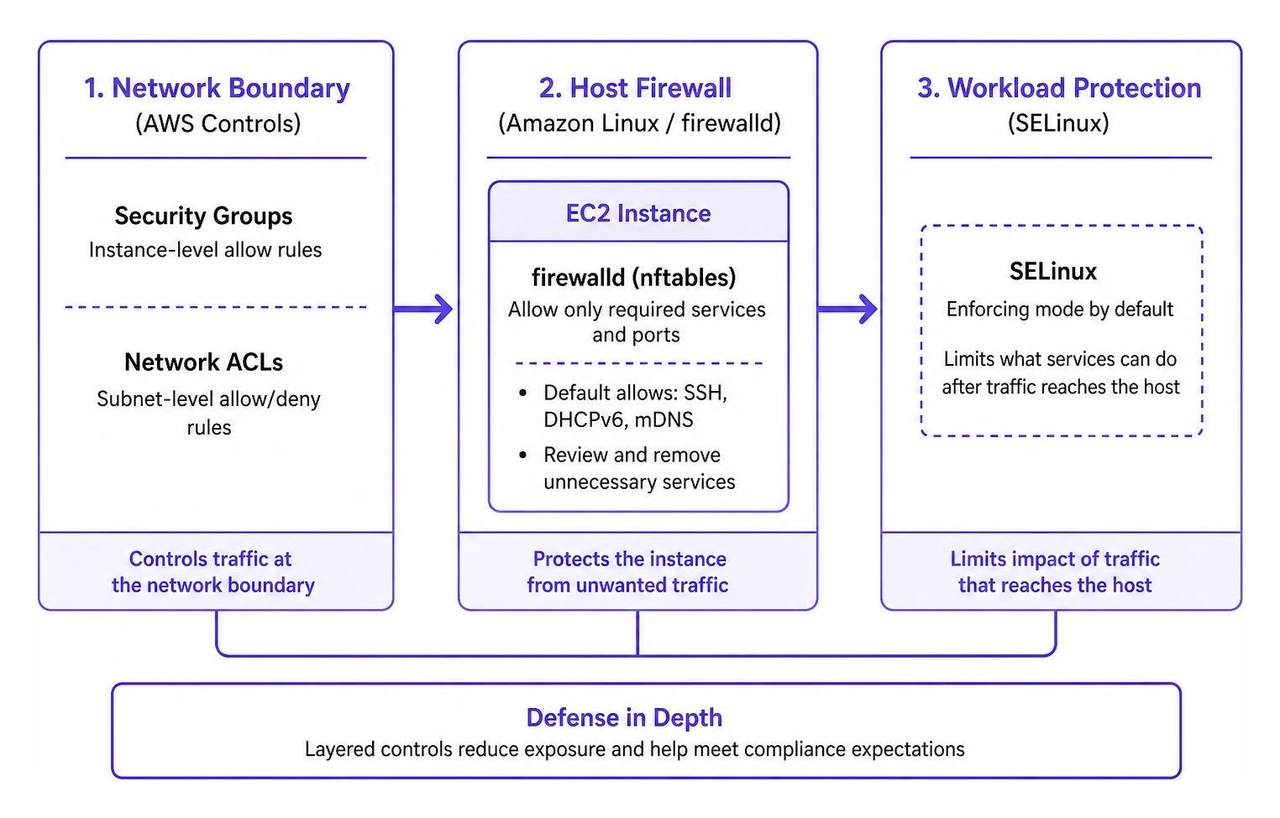
AWS controls protect the network boundary. A host firewall protects the instance itself. Together, they support defense in depth, reduce unnecessary exposure, and help meet compliance expectations. For Amazon Linux 2023, the default firewalld baseline permits SSH, DHCPv6, and mDNS; production systems should review that baseline and remove anything not required.
Amazon Linux 2027 raises the bar further by shipping with SELinux in enforcing mode by default. Firewall rules control network access, while SELinux limits what permitted services can do after traffic reaches the host. Both layers need to be checked when a service is unavailable.
I am Shahin Pirooz, a cybersecurity and cloud-services executive with more than 20 years of experience designing and operating secure cloud environments. In this guide, I will show you how to configure an Amazon Linux firewall in a way that supports secure EC2 operations without adding needless complexity.

Operating a robust host firewall within cloud-native infrastructure requires understanding how network filtering executes inside the Linux kernel. Modern Amazon Linux environments rely on the Netfilter subsystem, with the kernel processing packets according to structured rule tables and execution chains.
The primary daemon used to manage these packet filtering rules dynamically is firewalld. Unlike legacy architectures that required complete rule flushes to implement a change, firewalld provides an abstraction layer over the kernel packet filtering framework. It maintains both runtime state (which applies immediately to network interfaces) and permanent state (stored on disk and loaded upon daemon initialization).
In Amazon Linux 2023, the core daemon is distributed as a lightweight RPM. Reviewing the package details for firewalld shows that it weighs in at just 451.6 KB while packaging hundreds of preconfigured service definitions. Operating host firewalls in this manner ensures granular policy enforcement at the instance operating system boundary. To validate that these instance-level controls align with your overall cloud infrastructure governance, teams frequently integrate host checks while conducting a cloud security audit.
The modern Linux filtering landscape centers on nftables, which replaces the legacy iptables, ip6tables, ebtables, and arptables utilities with a consolidated bytecode engine and unified command syntax. Understanding when to interface directly with nftables versus using firewalld simplifies infrastructure automation.
Red Hat and enterprise Linux standards, detailed in Red Hat's packet filtering documentation, recommend using firewalld for general-purpose servers and dynamic zone-based interface management. firewalld acts as a high-level manager that translates zone definitions into underlying nftables tables behind the scenes.
Conversely, raw nftables is preferred for specialized workloads, high-throughput network routing appliances, or low-latency gateways where complex maps, sets, and custom packet verdicts are required without the overhead of a management daemon.
| Capability / Attribute | firewalld Management Daemon | Raw nftables Framework |
|---|---|---|
| Primary Abstraction | Zones, Services, and Rich Rules | Tables, Chains, Sets, and Verdict Maps |
| Backend Engine | Translates high-level XML/CLI to nftables | Native kernel Netfilter bytecode |
| Configuration State | Runtime and Permanent states managed separately | Loaded via script (/etc/sysconfig/nftables.conf) |
| Dynamic Updates | D-Bus interface; rules update without dropping states | Atomic rule replacement via CLI/script |
| Best Use Case | EC2 general instances, multi-zone hosts, STIG setups | High-performance proxies, routers, static rule sets |
Managing an Amazon Linux firewall effectively requires familiarity with the firewall-cmd management utility. This CLI tool communicates with the daemon over D-Bus to inspect, modify, and persist filtering policies.
AWS documentation on configuring AWS EC2 firewall rules emphasizes applying minimal necessary access. The following operations represent standard administrative workflows:
To query the active state and assigned network zones:sudo firewall-cmd --get-active-zonessudo firewall-cmd --zone=public --list-all
To open a specific network service (such as HTTPS) dynamically and persist it across reboots:sudo firewall-cmd --zone=public --add-service=httpssudo firewall-cmd --zone=public --permanent --add-service=httpssudo firewall-cmd --reload
To open a discrete TCP port for a custom application:sudo firewall-cmd --permanent --zone=public --add-port=8443/tcpsudo firewall-cmd --reload
To construct a rich rule that limits access to an administrative service from a specific source subnet:sudo firewall-cmd --permanent --zone=public --add-rich-rule='rule family="ipv4" source address="10.0.10.0/24" service name="ssh" accept'sudo firewall-cmd --reload
Amazon Linux 2023 minimal AMI builds often ship without an active host firewall daemon pre-installed, relying initially on the AWS hypervisor security group boundaries. To establish defense-in-depth, install and activate the daemon using dnf.
Deploying instance-level defenses complements your broader perimeter strategy, including services dedicated to deploying internet threat protection across endpoints and cloud instances.
Begin the installation and daemon activation sequence:
sudo dnf install -y firewalldsudo systemctl enable --now firewalldsudo systemctl status firewalld
Verify that the network interface (typically ens5 or eth0 on EC2 Nitro instances) is properly bound to your default operational zone:
sudo firewall-cmd --get-default-zonesudo firewall-cmd --zone=public --add-interface=ens5 --permanentsudo firewall-cmd --reload
Zones represent one of the most powerful concepts in modern Linux host security. A zone defines the level of trust assigned to a network interface or incoming source IP address.
Adhering to the principle of least privilege, production servers hosting cloud workloads should bind primary interfaces to the public zone and strictly prune default services. For organizations scaling multiple hosts across environments, coordinating these baseline rules is simplified through centralized cloud-based endpoint management strategies.
To remove unneeded default services such as multicast DNS (mdns):sudo firewall-cmd --permanent --zone=public --remove-service=mdnssudo firewall-cmd --reload
While AWS Security Groups can restrict SSH port 22 access to specific IP ranges at the hypervisor layer, maintaining restrictive boundary rules on the host itself ensures security remains intact even if an engineer inadvertently modifies a security group rule.
To implement host-level source restriction for SSH:
Remove unrestricted SSH access from the default public zone:sudo firewall-cmd --permanent --zone=public --remove-service=ssh
Introduce a rich rule permitting SSH solely from an internal management subnet or bastion host CIDR:sudo firewall-cmd --permanent --zone=public --add-rich-rule='rule family="ipv4" source address="172.16.50.0/24" service name="ssh" log prefix="SSH_ACCESS: " level="info" limit value="5/m" accept'
Reload the firewall daemon to commit the runtime changes:sudo firewall-cmd --reload
This rule combines CIDR filtering, kernel-level rate-limiting (limiting connection attempts to 5 per minute), and logging of connection events into the system journal.
Enterprise systems supporting sensitive, defense, or regulated commercial workloads must align with formalized security baselines. Open source ecosystems, backed by organizations like the Linux Foundation—which fosters over 1,300 open source projects and has trained more than 4 million developers—prioritize transparent, standardized configuration benchmarks.
The Defense Information Systems Agency (DISA) produces Security Technical Implementation Guides (STIGs) that establish baseline security configurations. Under the Amazon Linux 2023 STIG standards, having an active and correctly configured host firewall daemon is mandatory.
Specific benchmark controls, such as the DISA STIG firewalld mandate (V-274158 and SRG-OS-000096-GPOS-00050), dictate that operating systems must employ an active local packet filter to control traffic. Furthermore, requirements governing PPSM CAL port compliance mandate that all open ports and protocols must be explicitly documented and mapped against an approved Ports, Protocols, and Services Management Category Assurance List.
To verify STIG compliance on your Amazon Linux 2023 host:sudo firewall-cmd --list-all
Ensure that no unapproved services or ports are exposed:sudo firewall-cmd --permanent --zone=public --remove-service=dhcpv6-clientsudo firewall-cmd --reload
Security-Enhanced Linux (SELinux) provides mandatory access control (MAC) mechanisms within the kernel. Amazon Linux 2027 operates with SELinux in Enforcing mode by default, marking a major milestone for default host hardening in the Amazon Linux distribution lifecycle.
When modifying network listeners or altering standard ports (such as moving SSH from TCP 22 to TCP 2222), administrators must update both the firewall rules and the SELinux port labeling contexts. Failure to adjust SELinux will cause the kernel to block the application from binding to the network socket, even if the firewall permits the traffic.
To configure a custom port across both security layers:
Allow the port through firewalld:sudo firewall-cmd --permanent --zone=public --add-port=2222/tcpsudo firewall-cmd --reload
Label the port within SELinux policy:sudo semanage port -a -t ssh_port_t -p tcp 2222
If traffic fails, inspect the audit log for Access Vector Cache (AVC) denials:sudo ausearch -m avc --start recentsudo journalctl -t setroubleshoot
When application connectivity fails on an EC2 instance, diagnosing the issue methodically avoids unnecessary troubleshooting cycles. Network drops can occur at the AWS Security Group, the instance firewall, or via SELinux controls.
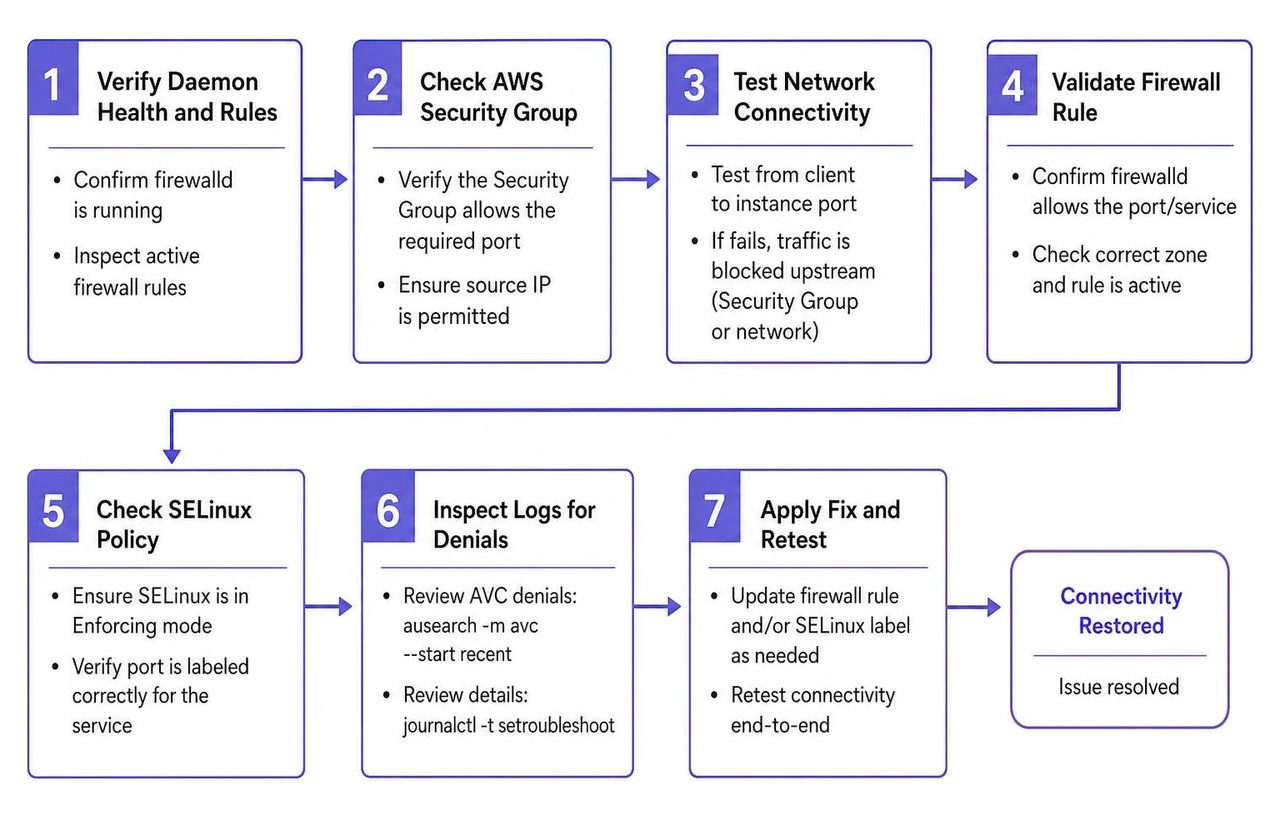
Execute these diagnostic steps to isolate host firewall issues:
Verify Daemon Health and Active Rules:Confirm that firewalld is running and inspect the active rule set:sudo systemctl status firewalldsudo firewall-cmd --list-all --zone=public
Inspect Underlying Kernel Nftables Rules:Because firewalld creates rules dynamically in nftables, query the raw rule tables to confirm rule insertion:sudo nft list ruleset
Monitor Real-Time Packet Drops:Enable kernel-level drop logging within firewalld to capture blocked packets in journalctl:sudo firewall-cmd --set-log-denied=allsudo journalctl -f -k | grep -E "filter_IN_public_REJECT|filter_DROP"
Examine Interface Binding:Verify that the network interface processing EC2 traffic is explicitly assigned to the expected zone:sudo firewall-cmd --get-zone-of-interface=ens5
AWS Security Groups function at the hypervisor level, filtering traffic before it reaches the operating system's virtual network adapter. However, relying exclusively on Security Groups leaves instances vulnerable to lateral threat movement from within the same VPC subnet if another host is compromised.
A host firewall establishes defense-in-depth, regulates traffic across local software interfaces (such as container bridges and virtual network taps), ensures compliance with DISA STIG and CIS benchmarks, and guarantees policy continuity if infrastructure-as-code scripts or cloud security groups are misconfigured.
When firewalld is installed on Amazon Linux, the default zone is set to public. The standard package profile permits inbound traffic for:
In hardened cloud production environments, non-essential services like mdns and dhcpv6-client (if IPv6 autoconfiguration is unused) should be explicitly removed to enforce a least-privilege security baseline.
Diagnosing dropped traffic requires checking both the packet filtering layer and kernel access control:
firewalld, run sudo firewall-cmd --list-all to ensure the desired port or service is explicitly listed in the active zone. Check dropped packet events by running sudo journalctl -k -g "REJECT".sudo ausearch -m avc -ts recent. If a denial is detected, the output will indicate which security context prevented the application from binding to or communicating over the target socket.Securing Amazon Linux workloads in cloud environments requires a layered defense strategy. While AWS network controls protect VPC boundaries, maintaining an active, hardened host firewall provides essential defense-in-depth against lateral movement, insider risks, and infrastructure misconfigurations.
Managing individual host configurations is a critical baseline, but enterprise resilience requires continuous visibility across your entire environment. WhiteDog’s Unified Cybersecurity Platform brings together Managed Detection and Response (MDR), Extended Detection and Response (XDR), Delta Detection & Response (DDR), exposure management, and complementary security capabilities with correlated intelligence and 24/7 SOC expertise. By integrating data across email, DNS, identity, endpoint, network, cloud, and data environments, WhiteDog eliminates fragmented visibility and transforms disconnected telemetry into actionable intelligence.
WhiteDog complements and extends your existing investments, including Microsoft environments, helping organizations maximize their existing Microsoft investment through seamless modular integration. WhiteDog’s Delta 360 (Δ360), built on WhiteDog’s Open XDR framework, adds a unified operational and security layer across Microsoft and third-party tools to improve correlation, visibility, security hardening, threat detection, exposure management, and response. Our continuous attack surface management and 24×7 security operations build on correlated intelligence to identify threats earlier and respond with confidence—offering Open XDR for unified visibility and detection only, alongside fully managed 24/7 SOC capabilities with incident response included in our MDR, XDR, and top-tier Delta Detection & Response (DDR) offerings.
To strengthen your cloud security posture and establish continuous visibility across your infrastructure, implement unified enterprise security solutions.


Verify AWS KMS FIPS compliance with this step-by-step guide covering FIPS 140-3 HSMs, endpoints, and auditing for regulatory alignment.

Navigate security compliance requirements across ISO 27001, SOC 2, and GDPR with a strategic blueprint for sustainable compliance management.

Learn how AI phishing detection stops next-gen attacks that bypass traditional defenses, with practical capabilities to evaluate.

Evaluate your cloud security audit options with this actionable checklist covering multi-cloud frameworks, CSPM, DSPM, and AI-driven automation.

Learn the five pillars of MSP risk reduction to secure operations, manage vendor risk, and build defensible compliance.

Learn how AI based malware detection stops polymorphic threats and zero-day attacks using deep learning, behavioral analysis, and multi-modal pipelines.