Cybersecurity
October 8, 2026
Master enterprise risk reduction with this detailed guide covering ERM frameworks, AI governance, and cybersecurity strategies for 2026.
Building a resilient cloud posture requires unified visibility across decentralized cloud infrastructure. AWS Security Hub acts as the central clearinghouse for cloud security posture management (CSPM) and threat detection data across AWS environments. Rather than forcing security engineers to log into dozens of individual consoles or correlate disparate log formats manually, Security Hub aggregates, normalizes, and prioritizes security findings into a single pane of glass. This practical AWS Security Hub guide walks through the architecture, configuration, and operational workflows that enterprise cloud teams need to implement it effectively.
At its architectural foundation, Security Hub functions through tight native integrations with underlying AWS governance constructs. It relies on AWS Identity and Access Management (IAM) policies, service-linked roles, and secure communication channels to ingest telemetry from supported services and custom sources. Understanding these core concepts is vital when operationalizing an enterprise cloud security guide:
AWSServiceRoleForSecurityHub service-linked role in your account. This role grants the service predefined permissions to describe resources, read security configurations, and retrieve finding data from integrated AWS tools without requiring custom credential rotation.To explore foundational definitions and service interactions in detail, security architects should consult the official AWS documentation on Security Hub concepts and terminology.
The core mechanism that enables Security Hub to unify disparate data streams is the AWS Security Finding Format (ASFF). ASFF is a standardized JSON schema that normalizes every finding ingested by Security Hub—whether generated by an internal compliance check, Amazon GuardDuty, Amazon Inspector, or a third-party security scanner.
Every ASFF finding contains essential metadata attributes, including:
SchemaVersion: The version of ASFF applied.Id: A unique identifier for the specific finding instance.ProductArn: The Amazon Resource Name (ARN) of the service or partner tool that generated the alert.GeneratorId: The identifier of the specific rule, check, or analyzer that triggered the finding.AwsAccountId and Region: The exact cloud location of the impacted asset.Resources: An array detailing the affected AWS resources, including resource types, ARNs, and service-specific details (such as AwsEc2Instance, AwsS3Bucket, or AwsCodeRepository).Severity: Normalized severity ratings categorized as INFORMATIONAL, LOW, MEDIUM, HIGH, or CRITICAL.Workflow: The lifecycle state of the finding, tracked via the Status field (NEW, NOTIFIED, RESOLVED, or SUPPRESSED).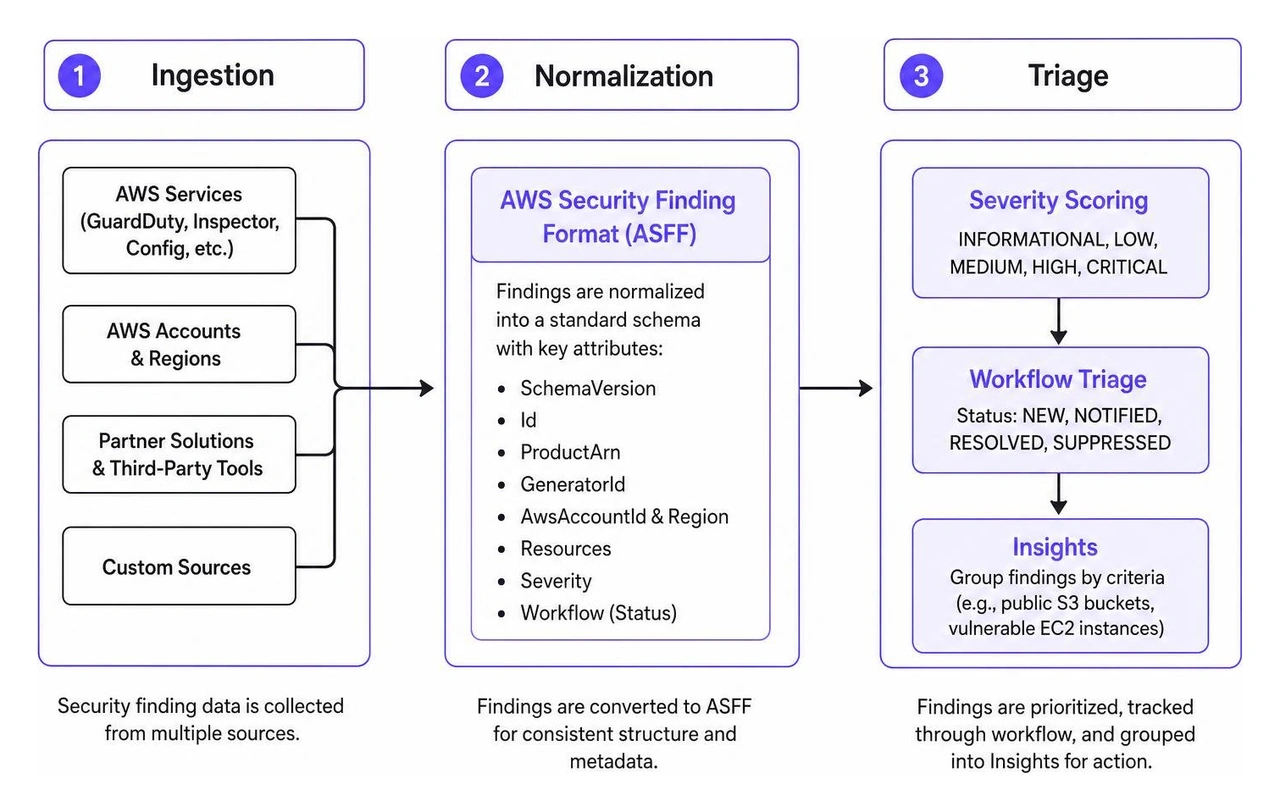
In this AWS Security Hub architecture, security controls represent the individual automated posture checks mapped to specific configuration rules. When resources deviate from an expected security baseline, Security Hub generates control findings.
To help security teams navigate thousands of discrete findings, Security Hub provides Insights. An Insight is a saved, managed collection of findings grouped by specific criteria (such as S3 buckets with public read access or EC2 instances with high-severity vulnerability detections).
Findings are stored within Security Hub for a minimum of 30 days. If a resource configuration is corrected, or if the underlying analyzer no longer detects the risk, Security Hub automatically transitions the finding record to an archived state or marks it as RESOLVED.
Enterprise organizations rarely operate within a single AWS account. Modern cloud architectures leverage dozens or hundreds of accounts segregated by business unit, environment, and regulatory boundary. Security Hub natively integrates with AWS Organizations to provide centralized governance across complex multi-account hierarchies.
To align with the AWS Security Reference Architecture (AWS SRA), organizations must designate a specific member account—typically a dedicated Security Tooling account—as the Security Hub delegated administrator. Designating this delegated administrator from the AWS Organizations management account ensures that your root organization account remains isolated from day-to-day operational security triage.
| Account Type | Primary Responsibilities | Administrative Permissions & Scope |
|---|---|---|
| Organizations Management Account | High-level organizational governance and billing | Designates delegated administrator accounts; cannot directly triage member findings unless configured. |
| Delegated Administrator Account | Centralized security operations and policy enforcement | Enables/disables Security Hub across all member accounts; manages compliance standards; views aggregated cross-account findings. |
| Member Account | Workload and application hosting | Generates local findings; cannot disable centralized standards enforced by the delegated administrator. |
Using the delegated administrator account, security teams can enable Auto-Enablement. This feature guarantees that whenever a new account is provisioned within AWS Organizations, Security Hub and its designated baseline standards are automatically activated in all target Regions. This eliminates governance blind spots and ensures continuous visibility across enterprise workloads during a cloud security audit.
Cloud Security Posture Management (CSPM) in Security Hub continuously monitors resource configurations against industry benchmarks and regulatory frameworks. By translating complex compliance mandates into automated configuration evaluations, CSPM helps organizations identify drift and misconfigurations before they can be exploited.

To conduct continuous compliance evaluations, Security Hub relies directly on AWS Config. AWS Config records configuration items and tracks state changes across cloud resources, providing the foundational inventory data evaluated by Security Hub's automated security controls. Detailed implementation procedures can be found in the AWS Security Hub CSPM prescriptive guidance.
When activating Security Hub CSPM, teams can select from multiple pre-curated compliance standards. Each standard is composed of discrete security controls that evaluate configurations against formal requirements:
Security Hub continuously updates these frameworks with modern controls. Modern updates to the FSBP standard include coverage expansions across critical services, such as:
EC2.172 through EC2.182 (advanced subnet, security group, and AMI baseline validations)ELB.17 and ELB.18 (TLS policy posture and listener encryption)RDS.38 through RDS.48 (database encryption, public accessibility, and multi-AZ resilience)Redshift.16 through Redshift.18 (data warehouse cluster security and audit logging)S3.25 (bucket lifecycle policies and encryption posture)SSM.5 through SSM.7 (managed node compliance and patch baseline enforcement)SageMaker.5 through SageMaker.8 (machine learning endpoint data encryption and notebook network isolation)Transfer.3 through Transfer.7 and FSx.3 through FSx.5 (secure file transfer protocols and managed file system encryption)Maintaining strong encryption standards across all storage repositories is fundamental for compliance, especially when implementing cryptographic governance aligned with AWS KMS FIPS compliance. When combined with an AWS security observability platform, these automated controls provide comprehensive baseline visibility.
Operating in a multi-Region AWS environment often leads to operational fragmentation. Security analysts are forced to switch console Regions constantly, increasing the likelihood of missed alerts. Security Hub solves this through Cross-Region Aggregation.
Cross-Region aggregation allows organizations to designate a single primary Aggregation Region. Once configured, findings, insights, and compliance check results from all Linked Regions are continuously replicated to the primary Region. Security operations personnel can then monitor, triage, and orchestrate responses from a unified global view.

To further reduce alert fatigue, Security Hub includes Consolidated Control Findings. In traditional posture assessments, enabling multiple standards (such as FSBP, CIS, and NIST) that share identical underlying checks (e.g., verifying whether an S3 bucket has public read access enabled) would generate three separate findings for the same misconfiguration.
When consolidated control findings is enabled, Security Hub CSPM generates a single finding for each security check of a control, regardless of how many enabled standards reference that check. This deduplication dramatically decreases alert noise and streamlines tracking.
When tracking environmental drift, teams can pair consolidated findings with an AWS delta detection guide to distinguish routine infrastructure updates from genuine security anomalies.
A robust security architecture must connect posture management with threat detection, vulnerability data, and runtime telemetry. Security Hub serves as an aggregation point, centralizing intelligence across the cloud attack chain.
By integrating findings across diverse sources into standardized ASFF records, security teams gain immediate operational context without navigating multiple specialized consoles.
Security Hub natively integrates out-of-the-box with core AWS security services. Once enabled, findings from these tools flow automatically into Security Hub without requiring custom agent installations or complex API plumbing:
Securing containerized workloads requires visibility from build to runtime. Correlating image scan results using AWS ECR vulnerability scanning ensures that vulnerable base images are flagged in Security Hub before deployment to Amazon EKS or ECS clusters.
In addition to native AWS services, Security Hub supports bidirectional integrations with a broad ecosystem of third-party security vendors. Integrations with enterprise observability and external monitoring platforms expand runtime visibility by forwarding application performance anomalies, infrastructure telemetry, and external vulnerability data directly into ASFF format.
External tools push findings to Security Hub using the BatchImportFindings API action. Each ingested finding undergoes validation against the ASFF schema:
When an external scanner remediates or clears an alert, it issues a finding update via the API, updating the Workflow.Status to RESOLVED and setting RecordState to ARCHIVED. This prevents stale records from cluttering operational dashboards and ensures that compliance audits reflect current environment state.
Visibility without rapid response increases exposure risk. Organizations must move beyond static dashboards by automating remediation workflows and establishing repeatable operational playbooks.
Security Hub integrates natively with Amazon EventBridge, allowing security teams to transform security findings into automated actions across multi-account environments.
Security Hub supports two primary operational response patterns: automated event-driven remediation and analyst-driven custom actions.
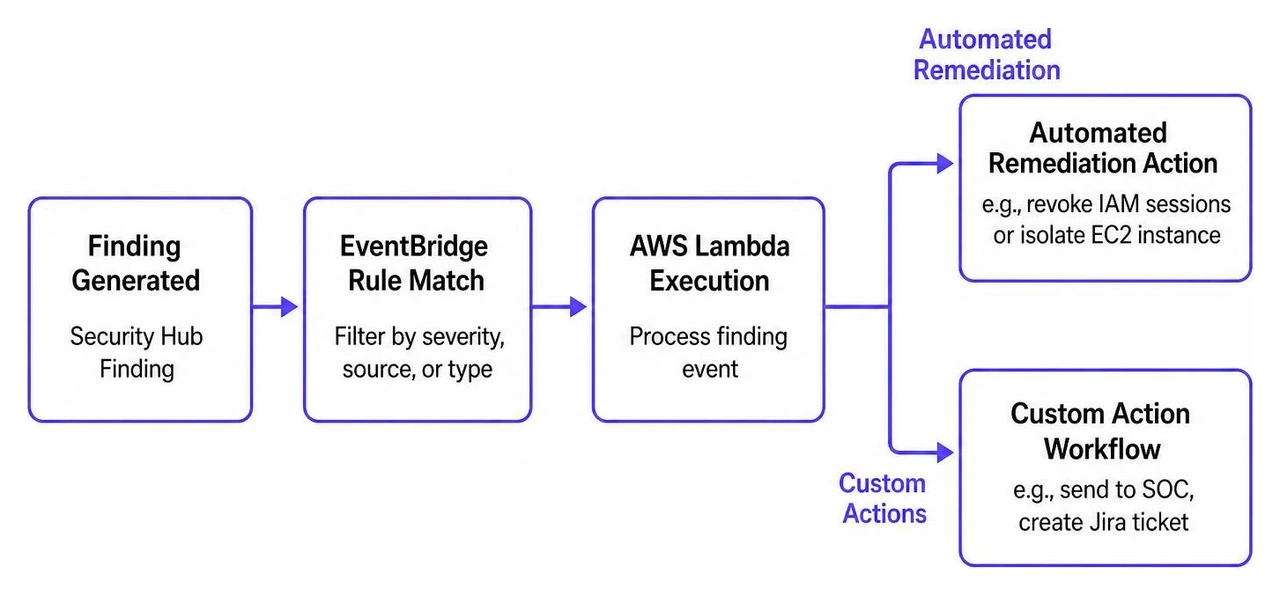
Integrating these event-driven pipelines with standardized AWS incident response solutions ensures that containment protocols occur within seconds of detection.
Scaling cloud security across large enterprises requires structured triage processes that prevent alert fatigue while ensuring critical risks are addressed immediately. Security Operations Centers (SOCs) should adopt a tiered triage strategy:
CRITICAL and HIGH findings, routing MEDIUM and LOW findings into scheduled posture-hardening sprints.For organizations managing complex cloud footprints, partnering with dedicated enterprise SOC operations provides the continuous analysis, threat hunting, and operational rigor required to maintain cloud hygiene at scale.
Security Hub pricing is based on two metered usage dimensions per account, per Region:
BatchImportFindings.Pricing tiers decrease as monthly volume thresholds are reached. To optimize costs across multi-account architectures, disable redundant standards, turn on consolidated control findings to eliminate duplicate evaluations, and scope AWS Config recording to only evaluated resource types.
Findings are stored within Security Hub for a minimum of 30 days from the date they were last updated. Once a finding is archived or resolved, it remains queryable until the retention window expires. Organizations requiring long-term historical records for compliance reporting or audit evidence must configure an EventBridge rule or Amazon Kinesis Firehose stream to export findings continuously into an Amazon S3 bucket for long-term archiving.
AWS Config acts as a configuration recording and inventory service that tracks resource state changes over time and assesses compliance against individual, customizable rules. AWS Security Hub is a higher-level Cloud Security Posture Management (CSPM) and threat aggregation service. Security Hub uses AWS Config rules under the hood to perform its automated compliance checks, normalizes telemetry from multiple external and native security services into ASFF format, calculates unified posture scores, and provides centralized multi-account governance.
AWS Security Hub provides the essential foundation for centralizing security visibility, evaluating continuous compliance against standards like FSBP and CIS Benchmarks, and automating responses across enterprise cloud environments. By enabling delegated administration, activating cross-Region aggregation, and leveraging the AWS Security Finding Format, organizations can replace disjointed tooling with an integrated posture management program.
However, cloud posture management is only one component of an effective defense strategy. Modern enterprises face sophisticated threats that span email, identity, endpoints, network boundaries, and multi-cloud infrastructure. WhiteDog Cyber’s Unified Cybersecurity Platform complements and extends existing AWS and Microsoft security investments, helping organizations maximize their return on existing tooling through modular integration rather than a rip-and-replace approach.
Built on WhiteDog’s Open XDR framework, Delta 360 (Δ360) adds a unified operational and security layer across Microsoft environments, AWS infrastructure, and third-party tools to improve correlation, visibility, security hardening, threat detection, exposure management, and response. While Open XDR delivers unified visibility and detection across your telemetry sources, WhiteDog’s MDR, XDR, and top-tier Delta Detection & Response (DDR) solutions provide fully managed, 24×7 SOC capabilities with incident response included directly. By combining continuous attack surface management and 24×7 security operations with correlated intelligence, WhiteDog empowers enterprise security teams to identify threats earlier, eliminate alert noise, and respond with confidence.


Master enterprise risk reduction with this detailed guide covering ERM frameworks, AI governance, and cybersecurity strategies for 2026.

Compare top AWS incident response solutions for rapid remediation, automated triage, and containment with native tools and expert escalation paths.

Harden your Amazon Linux firewall with firewalld and nftables to meet STIG compliance, block lateral movement, and secure AWS EC2 hosts.

Implement data governance to improve data quality, ensure compliance, and reduce risk across your enterprise lifecycle.

Master AWS Security Hub for unified cloud security posture, compliance automation, and streamlined SecOps workflows.

Learn how AWS delta detection response stops cloud alert noise by tracking state drift and securing Delta Lake workloads.